![CWpro_alt_white_r.png]](https://help.countingworkspro.com/hs-fs/hubfs/CWpro_alt_white_r.png?height=40&name=CWpro_alt_white_r.png)
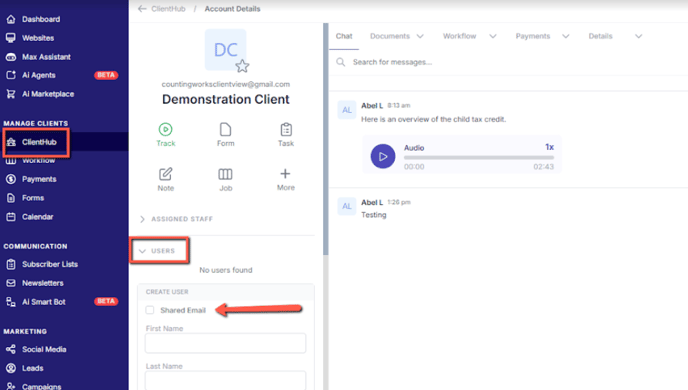
When adding a spouse or other collaborator to a client hub account, there are a few options regarding login credentials and access to documents. Here’s a breakdown of the process:
1. Using a Shared Email Address
- If the collaborator chooses to use a shared email address, they will use the same login information as the primary account holder.
- This means both individuals will have access to the same documents uploaded to the account, and they will log in with the same credentials.
2. Using a Separate Email Address
- If the collaborator opts to use their own email address, they will be asked to create a separate login with their own credentials.
- This allows the spouse to have independent access to the account, including any documents uploaded specifically for them.