![CWpro_alt_white_r.png]](https://help.countingworkspro.com/hs-fs/hubfs/CWpro_alt_white_r.png?height=40&name=CWpro_alt_white_r.png)
Prerequisites
- Applies to: User and Administrator
- Difficulty: Easy
- Time needed: Approximately 5 minutes to set forward / Additional 15 minutes for forward to function
- Tools required: apps.rackspace.com access for Users
Set up forwarding by using webmail
Use the following steps to forward email from your Rackspace Email address to another address using webmail:
- Log in to the mailbox to be forwarded at mail.clientwhys.com
- Click your username in the upper right-hand corner, then select Settings.
A settings pop-up box displays. - Click the Incoming Email tab on the left-hand side of this box.
- To the right, click the Forwarding tab.
- Click the On option for Status.
- Check the box next to Save a copy of forwarded email.
Warning: If Save a copy of forwarded email is not checked, this mailbox will not store any messages sent to it. - Enter the email address to which you want to forward email in the Forward to field.
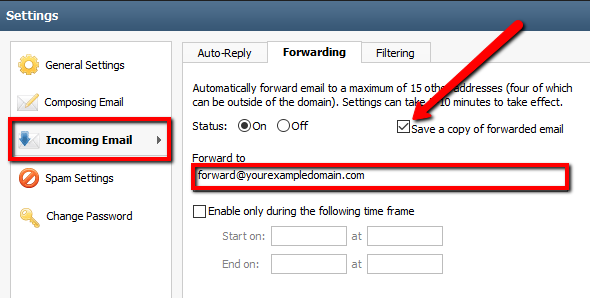
- Click Save.
Note: Allow at least 15 minutes after setup for the forward to be fully enabled.